The Financial Threat Landscape
Banking trojans are the most financially damaging category of mobile malware. They target banking apps, cryptocurrency wallets, and payment systems to steal money directly from victims. Unlike spyware that monitors behavior, banking trojans actively participate in fraudulent transactions.
Major Banking Trojan Families
Anatsa
First seen: 2021. Platform: Android. Status: Active in 2026.
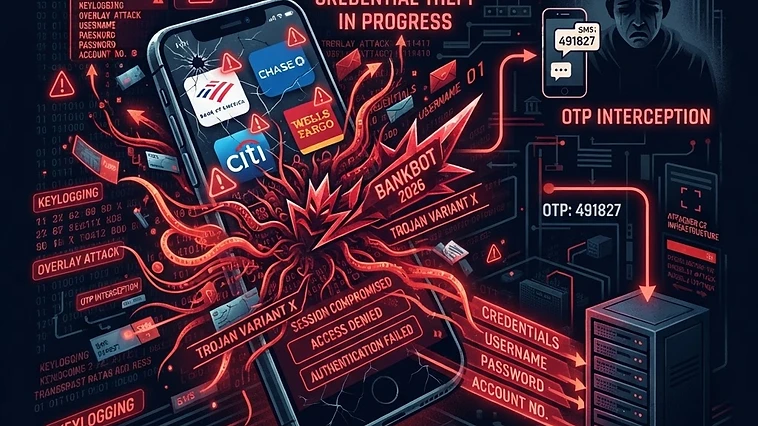
Capabilities: OTP interception, credential phishing (overlay), remote access, ATS (Automated Transfer System), keylogging, screen capture.
Distribution: Google Play Store (through seemingly legitimate apps that download payloads later), sideloaded APKs, phishing links.
Targets: Major banking apps in US, UK, Europe. Cryptocurrency wallet apps. Payment apps (PayPal, Cash App, Venmo).
FluBot (Disrupted but Influential)
First seen: 2020. Status: Disrupted by Europol in 2022, but techniques live on.
Capabilities: SMS forwarding, contact theft, call interception, accessibility abuse, self-spreading via SMS.
Legacy: Techniques influenced later banking trojans. SMS-based self-spreading model still used. Accessibility-based overlay attacks became standard.
Cerberus
First seen: 2019. Status: Source code leaked, variants continue.
Capabilities: OTP interception, overlay attacks, remote access, keylogging.
Legacy: Source code leak enabled many variants. MaaS model adopted by later trojans. Demonstrated profitability of mobile banking trojans.
SharkBot
First seen: 2021. Status: Active in 2026.
Capabilities: ATS (automated transfer system), overlay attacks, remote access, auto-transfers when funds available.
Distribution: Sideloaded through fake antivirus apps, phishing campaigns, disguised as utility apps.
New 2026 Variants
Hybrid trojans (surveillance + financial theft like ZeroDayRAT). AI-enhanced phishing. Multi-platform trojans. DeFi-targeting trojans. NFT-targeting trojans.
Common Banking Trojan Techniques
Overlay Attacks
The most common technique: user opens a legitimate banking app, trojan detects it, displays a fake login screen, user enters credentials, trojan captures them.
OTP Interception
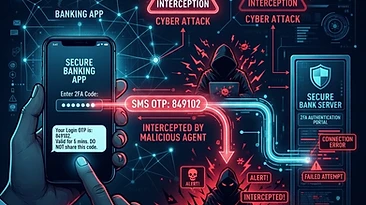
Defeats SMS-based 2FA: trojan intercepts SMS OTP via SMS permission or notification access, sends OTP to attacker, attacker completes fraudulent transaction.
ATS (Automated Transfer System)
Automates fund theft: trojan has credentials and OTP access, automatically initiates transfers, automatically enters OTP codes, funds transferred before user notices.
Keylogging
Captures typed credentials via accessibility service. Sends credentials to C2. Attacker uses credentials to access account.
Clipboard Hijacking
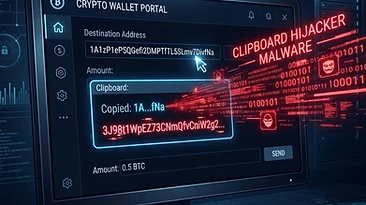
Steals cryptocurrency: user copies wallet address, trojan replaces with attacker's address, user pastes modified address, funds sent to attacker.
How Banking Trojans Get on Your Phone
Distribution Channels
Google Play Store (seemingly legitimate apps with hidden payloads). Sideloaded APKs (phishing links, fake updates, free versions). SMS phishing. Social engineering.
Permission Acquisition
After installation, trojans need: accessibility (overlay + keylogging), SMS (OTP interception), notifications (OTP interception), overlay (phishing), device admin (persistence). All obtained through social engineering.
How to Defend Against Banking Trojans
For Users
Use phishing-resistant 2FA (hardware keys, passkeys, authenticator apps). Avoid sideloading. Audit permissions regularly. Use mobile banking safely (biometrics, transaction notifications, withdrawal limits). Monitor accounts regularly.
For Financial Institutions
App security (shielding, device binding, behavioral biometrics). Transaction monitoring (real-time fraud detection, anomaly detection, device fingerprinting). Customer education. Threat intelligence.
Frequently Asked Questions
What is the most common banking trojan in 2026?
Anatsa remains one of the most active and sophisticated banking trojans in 2026, with new variants and targets emerging regularly.
Can banking trojans steal money even with 2FA?
Yes. They intercept SMS OTP codes and can click approve on push 2FA via accessibility. Use phishing-resistant 2FA (hardware keys, passkeys).
How do I know if I have a banking trojan?
Check Settings > Accessibility for unknown apps, check Settings > Apps for suspicious apps, watch for unusual battery/data usage, monitor banking activity.
Can iPhone get banking trojans?
iOS banking trojans are rare due to stricter security. Jailbroken devices, MDM profiles, and enterprise cert apps can potentially deliver them.
What should I do if I suspect a banking trojan?
Contact your bank immediately, freeze accounts, change passwords from a separate clean device, audit permissions, consider factory reset. Report to law enforcement if funds were stolen.