The Weak Link in Two-Factor Authentication
SMS-based one-time passwords (OTP) are the most common form of two-factor authentication (2FA) in the world. Banks, social media platforms, email providers, and cryptocurrency exchanges all use SMS OTP to verify user identity.
But SMS OTP has a critical weakness: the OTP code is delivered to the same device that may be compromised. If a mobile device is infected with spyware, the attacker can intercept OTP codes before the user ever sees them.
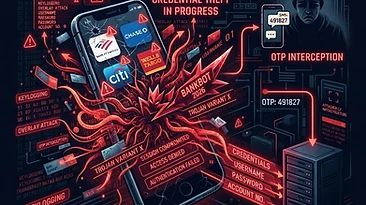
This is not a theoretical attack. Banking trojans and commercial spyware like ZeroDayRAT routinely intercept SMS OTP codes to defeat 2FA and gain access to banking accounts, cryptocurrency wallets, and email accounts.
How SMS OTP Interception Works
The Normal Flow
- User enters username and password on a banking website
- The bank sends an SMS with a 6-digit OTP code to the user's phone
- The user reads the code and enters it on the website
- The bank verifies the code and grants access
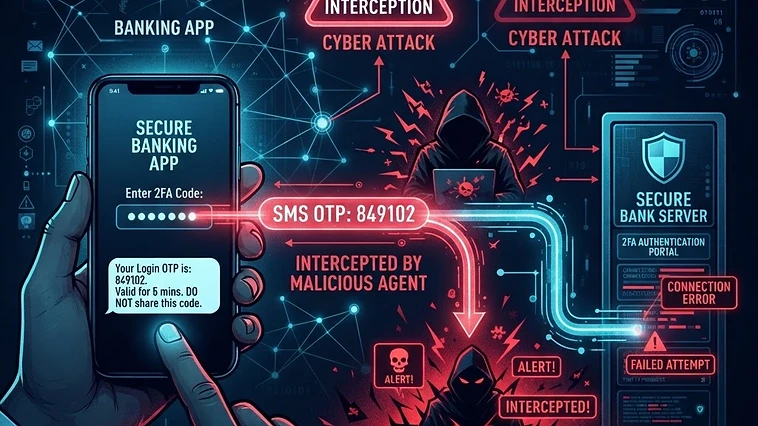
The Intercepted Flow
- User enters username and password (possibly stolen via keylogging)
- The bank sends an SMS with a 6-digit OTP code to the user's phone
- The spyware intercepts the SMS before the user sees it
- The spyware sends the code to the attacker's C2 server
- The attacker uses the code to access the account
- The user may never know the code was intercepted
Technical Mechanisms
Spyware intercepts SMS OTP through several mechanisms:
SMS Permission (Android)
Android apps with READ_SMS and RECEIVE_SMS permissions can read all incoming SMS messages. Spyware requests these permissions through social engineering:
- "Enable SMS access to back up your messages"
- "Allow SMS access for verification"
- "Grant SMS permission for security alerts"
Once granted, the spyware can read all SMS messages, including OTP codes, in real time.
Notification Access (Android)
Android apps with notification access can read all notifications, including SMS notifications. This means:
- The OTP code appears in the SMS notification preview
- The spyware reads the notification before the user opens the SMS app
- The spyware extracts the OTP code from the notification text
This is particularly dangerous because notification access is a single permission that grants access to ALL notifications, not just SMS.
Accessibility Service (Android)
Apps with accessibility access can read all screen content, including:
- OTP codes displayed in SMS apps
- OTP codes displayed in banking app notifications
- OTP codes entered in web forms
- OTP codes displayed in authenticator apps
This is the most powerful interception method because it can capture OTP codes from any source, not just SMS.
Clipboard Monitoring
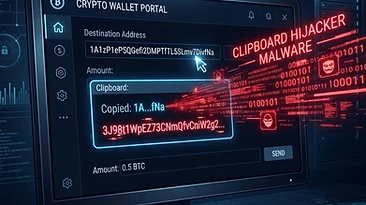
Some banking apps copy OTP codes to the clipboard for convenience. Spyware can monitor the clipboard and capture:
- Copied OTP codes
- Copied cryptocurrency wallet addresses
- Copied passwords
- Any other sensitive clipboard content
Which OTP Methods Are Vulnerable?
SMS OTP — Highly Vulnerable
SMS OTP is the most vulnerable 2FA method because:
- The code is delivered as plain text
- It can be intercepted by any app with SMS or notification permissions
- It can be read from the screen by accessibility-based spyware
- It can be intercepted at the carrier level (SIM swapping)
Push Notification OTP — Vulnerable
Push-based OTP (where the bank sends a push notification with an approve/deny prompt) is also vulnerable:
- The push notification can be intercepted by notification access
- The approve button can be clicked by accessibility-based spyware
- The push notification content can be read by screen capture
Authenticator App OTP — Less Vulnerable
TOTP apps (Google Authenticator, Authy, Microsoft Authenticator) generate codes locally on the device. They are less vulnerable because:
- No SMS or push notification to intercept
- The code is generated locally, not transmitted
- BUT: accessibility-based spyware can still read the code from the screen
Hardware Security Keys — Most Resistant
Hardware security keys (YubiKey, Titan, FIDO2) are the most phishing-resistant 2FA method:
- The key must be physically present
- The authentication is cryptographically bound to the legitimate website
- Spyware cannot intercept the cryptographic exchange
- Even if the device is compromised, the key prevents unauthorized access
Real-World Attack Scenarios
Banking Account Takeover
- Attacker steals the victim's banking username and password (via phishing or keylogging)
- Attacker attempts to log in, triggering an SMS OTP
- Spyware on the victim's phone intercepts the OTP
- Attacker uses the OTP to access the banking account
- Attacker transfers funds to their own account
Cryptocurrency Wallet Theft
- Attacker steals the victim's exchange credentials
- Attacker attempts to withdraw funds, triggering an SMS OTP
- Spyware intercepts the OTP
- Attacker uses the OTP to authorize the withdrawal
- Funds are transferred to the attacker's wallet
Email Account Takeover
- Attacker steals the victim's email password
- Attacker attempts to log in from a new device, triggering an SMS OTP
- Spyware intercepts the OTP
- Attacker gains access to the email account
- Attacker uses the email to reset passwords for other accounts (banking, social media, etc.)
SIM Swap Attack (Related)
SIM swapping is a related attack where the attacker convinces the carrier to transfer the victim's phone number to a SIM card they control. This allows the attacker to receive all SMS messages, including OTP codes, without needing spyware on the victim's device.
How to Protect Against OTP Interception
Use Phishing-Resistant 2FA
- Hardware security keys (YubiKey, Titan) — most secure
- Passkeys (FIDO2/WebAuthn) — phishing-resistant, no OTP to intercept
- Platform authenticators (Touch ID, Face ID, Windows Hello) — tied to device biometrics
Avoid SMS OTP for High-Value Accounts
- Use authenticator apps (Google Authenticator, Authy) for banking and cryptocurrency
- Use hardware security keys for email and password manager access
- Avoid SMS OTP for any account that controls other accounts
Monitor for Spyware
- Audit Android permissions regularly (SMS, notifications, accessibility)
- Use MTD (Mobile Threat Defense) solutions
- Watch for unexpected SMS messages or notifications
- Monitor banking and exchange account activity
Use App-Based OTP
Authenticator apps generate codes locally, reducing interception risk:
- Google Authenticator — simple, widely supported
- Authy — cloud backup, multi-device
- Microsoft Authenticator — integrates with Microsoft accounts
- 1Password — built-in authenticator in password manager
Enable Additional Security Layers
- Withdrawal whitelist — only allow withdrawals to pre-approved addresses
- Transaction confirmation — require additional confirmation for large transfers
- Login alerts — receive alerts for new device logins
- Account lockout — lock account after suspicious activity
Frequently Asked Questions
Is SMS 2FA safe?
SMS 2FA is better than no 2FA, but it is not safe against targeted attacks. Spyware can intercept SMS OTP codes, and SIM swapping can redirect SMS messages to the attacker. Use authenticator apps or hardware keys for high-value accounts.
Can ZeroDayRAT intercept OTP codes?
Yes. ZeroDayRAT reportedly includes SMS access and notification access capabilities that enable OTP interception. This is one of its primary financial targeting features.
What is the most secure 2FA method?
Hardware security keys (FIDO2/WebAuthn) are the most secure 2FA method. They are phishing-resistant, cannot be intercepted by spyware, and require physical presence. Passkeys offer similar security without dedicated hardware.
How do I know if my OTP was intercepted?
You may not know — the attacker uses the code before you see it. Signs include unauthorized account access, unexpected login alerts, or transactions you did not authorize. Enable login alerts and monitor account activity regularly.