When Your Phone Is Compromised
Suspecting that your mobile device has been compromised by spyware is alarming. The right response can limit the damage, preserve evidence, and restore security. The wrong response can destroy evidence, alert the attacker, and leave you vulnerable.
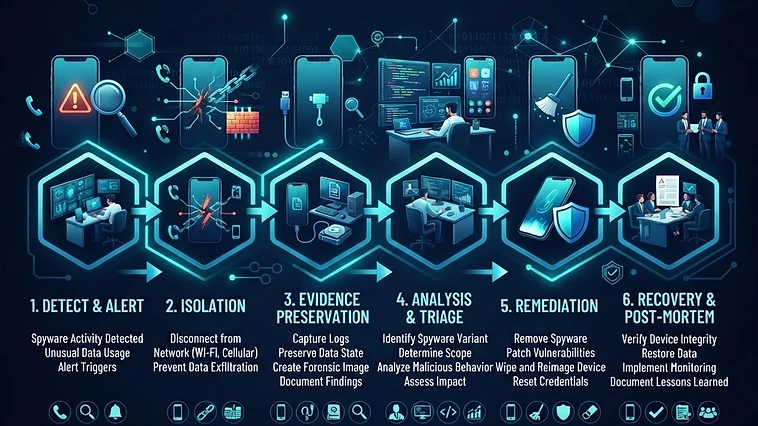
Phase 1: Detection and Triage (0-1 Hour)
Step 1: Assess the Situation
What triggered your suspicion? Apple/Google threat notification, unusual device behavior, suspicious app or permission, account compromise, or someone told you they have information about you.
Assess severity: Critical (high-risk user with suspected mercenary spyware), High (suspected commercial spyware), Medium (suspected stalkerware), Low (general suspicion).
Step 2: Don't Panic, Don't Reset
Critical: Do NOT factory reset the device yet. A factory reset destroys forensic evidence, removes the spyware (but you lose the ability to investigate), may not remove MDM profiles, and prevents you from understanding what was compromised. Instead, isolate the device.
Step 3: Move to a Clean Device
If you need to continue communicating, use a separate known-clean device. Don't use the suspected device for sensitive communications, logging into accounts, or banking.
Phase 2: Isolation (1-2 Hours)
Step 4: Isolate the Device
- Put the device in airplane mode (stops all network communication)
- Remove the SIM card (prevents cellular communication)
- Turn off Wi-Fi and Bluetooth
- Do NOT connect to any network
- Keep the device powered on (preserves volatile evidence)
Why not turn it off? Turning off may trigger self-destruct in some spyware. Volatile evidence (RAM) is lost on power-off. Some spyware only runs when the device is on.
Why not factory reset? Destroys evidence, prevents forensic analysis, may not remove all spyware (MDM profiles, persistent implants).
Step 5: Secure Your Accounts
From a SEPARATE clean device:
- Change passwords for all accounts accessible from the compromised device (email, banking, social media, cloud, work)
- Revoke active sessions and tokens (Google, Apple, Microsoft, social media)
- Re-enroll MFA from the clean device (prefer phishing-resistant: hardware keys, passkeys)
- Check for and remove email forwarding rules
- Review and revoke OAuth app grants
Phase 3: Evidence Preservation (2-4 Hours)
Step 6: Document the Device State
Take photos and notes: home screen, all installed apps, Settings > Accessibility (Android) or Settings > General > VPN & Device Management (iOS), Settings > Apps, Settings > Privacy > Permission Manager (Android). Note device model, OS version, date and time of discovery, what triggered suspicion.
Step 7: Preserve the Device
For high-value cases (forensic investigation likely): keep the device isolated, store securely, do not use, document who has access, consider professional forensic analysis.
For lower-value cases: document the state, proceed to remediation, factory reset is acceptable after documentation.
Step 8: Collect Network Evidence (If Available)
If you have access to network logs: DNS logs, proxy logs, VPN logs, firewall logs. These may reveal C2 communication and data exfiltration.
Phase 4: Forensic Analysis (4-24 Hours)
Step 9: Run MVT (If Applicable)
For Android: connect device via USB (enable USB debugging first), run MVT Android analysis. For iOS: create encrypted backup using iTunes/Finder, run MVT iOS backup analysis.
Step 10: Manual Analysis
Android checks: List all installed packages, check accessibility services, check device admin apps, review dangerous permission combinations, check for apps from unknown sources.
iOS checks: Check for configuration profiles, check for MDM enrollment, check for enterprise-cert apps, check for custom keyboards, review analytics data for anomalies.
Step 11: Seek Professional Help (For High-Risk Cases)
Organizations that can help: Amnesty Tech Security Lab (forensic analysis for civil society), Citizen Lab (forensic analysis for journalists and activists), Access Now Digital Security Helpline (24/7 support), EFF (guidance for journalists and activists), National CERT.
Phase 5: Remediation (24-48 Hours)
Step 12: Factory Reset
After evidence preservation: back up needed data (contacts, photos, NOT apps), factory reset the device, do NOT restore from backup (may restore spyware), set up the device as new.
Step 13: Reconfigure Securely
After factory reset: install OS updates, enable Lockdown Mode (iOS) or Advanced Protection (Android) for high-risk users, configure strong authentication, install only essential apps from official stores, configure MDM (if corporate), install MTD (if enterprise), grant permissions minimally.
Step 14: Re-enroll in Services
From the clean, reset device: log into accounts using new credentials, set up phishing-resistant MFA, configure banking apps with biometric authentication, set up email with new passwords and MFA, install work apps through MDM.
Phase 6: Post-Incident Monitoring (Ongoing)
Step 15: Monitor for Re-compromise
Watch for: unusual device behavior, unexpected permission requests, new apps you didn't install, account access from unexpected locations, unusual network activity.
Step 16: Monitor Accounts
For weeks after the incident: check banking and financial accounts daily, review email for unauthorized access, monitor social media, check cloud storage, review credit reports for identity theft.
Step 17: Post-Incident Review
After the incident: What was the entry vector? What data was compromised? How long was the device compromised? What can be improved? Do you need additional security measures?
Step 18: Report (If Appropriate)
Consider reporting to: law enforcement (if a crime was committed), your organization (if corporate data was compromised), Apple/Google (to help improve platform security), threat intelligence communities (to share IOCs), support organizations (for emotional and practical support).
Quick Reference: Do's and Don'ts
DO: Isolate the device (airplane mode, remove SIM). Preserve evidence (photos, notes, don't reset). Reset credentials from a separate clean device. Seek professional help for high-risk cases. Document everything.
DON'T: Factory reset immediately (destroys evidence). Use the compromised device for sensitive communications. Log into accounts from the compromised device. Confront a suspected stalker (may escalate danger). Panic.
Frequently Asked Questions
Should I factory reset immediately?
No. In a high-value case, factory reset destroys forensic evidence. Isolate the device, preserve evidence, and reset credentials from a separate clean device first.
Should I contact law enforcement?
If the compromise involves targeted surveillance of a high-risk individual, consider contacting your national CERT, law enforcement, or organizations like Amnesty Tech, Citizen Lab, or Access Now.
How do I know if the spyware is gone?
After factory reset and reconfiguration, run MVT again. Monitor for unusual behavior. For mercenary spyware, consider professional forensic analysis to confirm removal.
What if I can't afford professional help?
Access Now Digital Security Helpline provides free 24/7 support for civil society. Amnesty Tech and Citizen Lab provide free forensic analysis for journalists and activists. EFF provides guidance for free.
Should I tell anyone?
If in a domestic abuse situation, don't confront the abuser. If a journalist or activist, contact support organizations. If corporate data was compromised, notify your security team. Document everything for potential legal action.