The Wrong Question
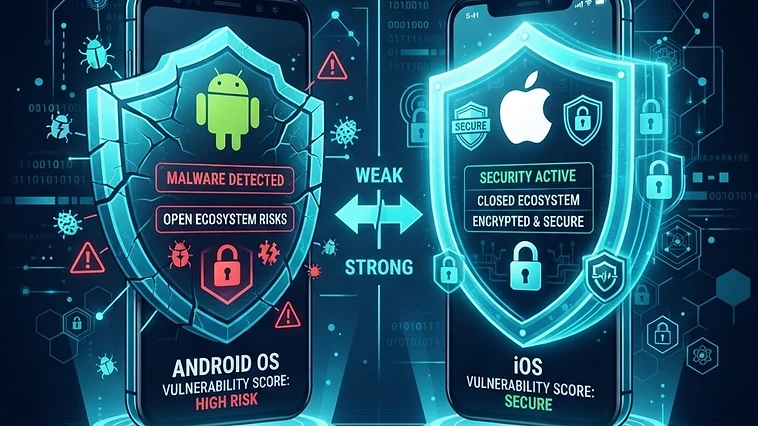
"Which is more secure, Android or iOS?" is the wrong question. The right question is: "Which platform is more secure against the threats I face?"
Both Android and iOS have strengths and weaknesses. The "best" platform depends on the threat model, the user's risk profile, and the specific capabilities they need. Understanding the real differences — not the marketing claims — is essential for making informed security decisions.
Android Security Architecture
Strengths
Open Ecosystem
- Google Play Protect — scans billions of apps
- Rapid security patches — monthly security updates
- Advanced Protection Program — for high-risk users
- Diverse hardware — multiple manufacturers, varied security features
- Transparency — open-source components allow independent review
Granular Permissions
- Runtime permissions — apps request permissions at runtime
- Permission manager — central permission management
- One-time permissions — temporary permission grants
- Background restrictions — limits on background activity
Enterprise Management
- Android Enterprise — comprehensive MDM
- Work profiles — separate work and personal data
- Zero-touch enrollment — automated device provisioning
Weaknesses
Fragmentation
- Slow updates — many devices don't receive timely updates
- Manufacturer delays — OEMs delay security patches
- Carrier delays — carriers add their own delays
- EOL devices — devices that no longer receive updates
Sideloading
- APK installation — apps can be installed from outside Play Store
- No review — sideloaded apps bypass Play Store review
- Social engineering — users are tricked into sideloading
Accessibility Abuse
- Powerful API — accessibility can read all screen content
- Spyware vector — primary mechanism for Android spyware
- User-granted — users can grant it without technical barriers
Permission Complexity
- Many permissions — users may not understand all permissions
- Permission fatigue — users grant permissions without reading
- Dangerous combinations — multiple permissions create risk
iOS Security Architecture
Strengths
Closed Ecosystem
- App Store review — all apps are reviewed by Apple
- Code signing — all apps must be signed by valid certificates
- No sideloading — apps can only be installed from App Store (without enterprise cert)
- Rapid updates — Apple pushes updates directly to all devices
Strong Sandboxing
- App isolation — apps cannot access other apps' data
- No accessibility API — iOS apps cannot read other apps' content
- Strict permissions — more restrictive than Android
- Trusted execution — secure enclave for sensitive operations
Lockdown Mode
- Extreme security — for high-risk users
- Blocks attack vectors — prevents zero-click delivery
- Blocks MDM installation — prevents MDM-based attacks
- Apple commitment — expanding protections over time
Weaknesses
Closed Nature
- Limited transparency — less independent review
- Apple controls everything — less user choice
- Single source — all security depends on Apple
- Slower to acknowledge — Apple has been slow to acknowledge threats
MDM Vulnerability
- Configuration profiles — can be abused for surveillance
- Enterprise certs — can be abused to sign malicious apps
- Social engineering — users can be tricked into installing profiles
Jailbreaking
- Removes security — jailbreaking strips all iOS protections
- Enables spyware — jailbroken devices are highly vulnerable
- Still common — some users jailbreak for customization
Cost Barrier
- Expensive devices — iPhones are more expensive
- Limited options — fewer budget options
- Ecosystem lock-in — Apple ecosystem is expensive to leave
Direct Comparison: Spyware Resistance
Permission-Based Spyware (ZeroDayRAT, stalkerware)
Android: More vulnerable
- Accessibility service enables screen capture and keylogging
- SMS and notification access enables OTP interception
- Overlay permission enables phishing
- Sideloading enables easy distribution
iOS: More resistant
- No accessibility API for third-party apps
- No SMS access for third-party apps
- No overlay permission
- No sideloading (without enterprise cert or jailbreak)
Winner: iOS
MDM-Based Attacks
Android: Less vulnerable
- MDM is less common on Android
- Android Enterprise is more transparent
- Profiles are more visible
iOS: More vulnerable
- MDM profiles can grant significant control
- Profiles can be installed through social engineering
- Enterprise certs can sign malicious apps
Winner: Android (slightly)
Zero-Day / Zero-Click Attacks (Pegasus)
Android: Vulnerable
- Multiple documented zero-day attacks
- Fragmentation means some devices are always unpatched
- Diverse hardware means varied attack surfaces
iOS: Vulnerable but better defended
- Multiple documented zero-day attacks (FORCEDENTRY, etc.)
- Lockdown Mode provides significant protection
- Rapid updates mean shorter vulnerability windows
Winner: iOS (with Lockdown Mode)
Social Engineering
Android: More vulnerable
- Sideloading is easy and common
- Users are accustomed to installing from outside Play Store
- Permission requests are more frequent
iOS: More resistant
- Sideloading is difficult (requires enterprise cert or jailbreak)
- Users are accustomed to App Store only
- Permission requests are less frequent
Winner: iOS
Update Speed
Android: Weak
- Fragmentation causes delays
- Many devices never receive updates
- EOL devices are permanently vulnerable
iOS: Strong
- Apple pushes updates directly
- High adoption rate (80%+ within months)
- Long support lifecycle (5+ years)
Winner: iOS
Which Platform Is Safer for Different Users?
For General Users
iOS is safer — App Store review, no sideloading, strong sandboxing, rapid updates. The closed ecosystem provides better default security for users who don't configure their devices.
For High-Risk Users
iOS with Lockdown Mode is safer — Lockdown Mode blocks many attack vectors, Apple's rapid updates patch vulnerabilities quickly, and the closed ecosystem limits attack surface.
For Enterprise Users
Depends on implementation — both platforms can be secured with MDM and MTD. Android Enterprise offers more granular control, but iOS is easier to secure uniformly.
For Users in High-Risk Countries
iOS with Lockdown Mode — mercenary spyware targets both platforms, but Lockdown Mode provides significant additional protection. However, consider that some countries restrict iPhone use.
For Privacy-Conscious Users
Depends on threat model — iOS provides better default privacy, but Android offers more transparency and control. Choose based on your specific privacy concerns.
For Budget-Conscious Users
Android with careful configuration — budget Android devices receive fewer updates, but careful configuration (no sideloading, permission auditing, Play Protect) can provide reasonable security.
The Bottom Line
Neither platform is inherently "secure" or "insecure." Security depends on:
- The threat model — what are you defending against?
- The user's behavior — do they sideload, grant permissions carelessly?
- The device's configuration — is it updated, hardened, managed?
- The specific device — flagship vs. budget, supported vs. EOL
For most users, iOS provides better default security. For users willing to configure their devices carefully, Android can be equally secure. For high-risk users, iOS with Lockdown Mode is the strongest option.
Frequently Asked Questions
Is iOS really more secure than Android?
For most users, yes. iOS has stronger default security (App Store review, no sideloading, strong sandboxing). However, a carefully configured Android device can be equally secure.
Can Android be as secure as iOS?
Yes, with careful configuration: no sideloading, permission auditing, Play Protect, MDM, MTD, and regular updates. The challenge is that most users don't configure their devices this carefully.
Should I switch from Android to iOS for security?
If you're a high-risk user (journalist, activist, executive), consider switching to iOS with Lockdown Mode. For general users, either platform is fine with good security practices.
Does jailbreaking/rooting make my phone more secure?
No. Jailbreaking (iOS) and rooting (Android) remove security protections and make your device more vulnerable to spyware. Never jailbreak or root a device you use for sensitive activities.